You can personalize and customize the pivot table appearance.
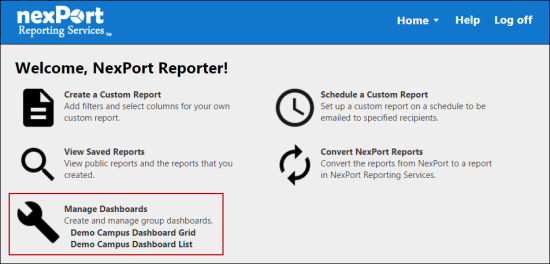
- On the NRS homepage, click Manage Dashboards.
-
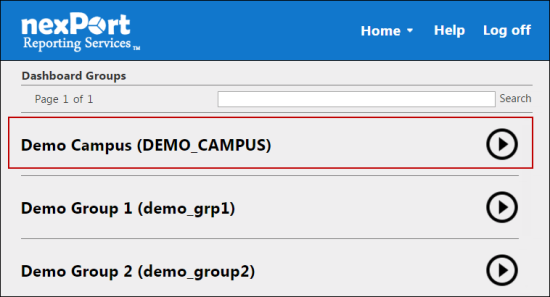
- The Dashboards Groups page is displayed.
- Select a group to view its dashboards.
-
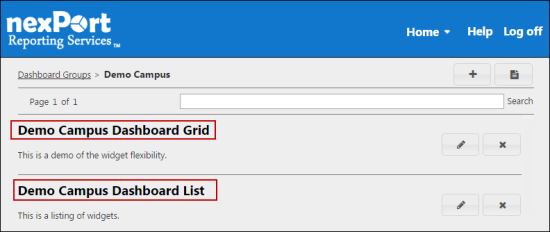
- A dashboard list for the selected group is displayed.
- Select a dashboard (Grid view or List view) to which you need to add a pivot table.
-
- The <DashboardName> page is displayed.
-
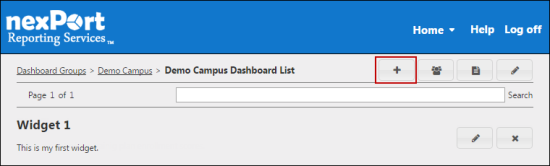
- In the upper-right corner, click the
 icon.
icon.
- The Add Widget dialog box is displayed.
-
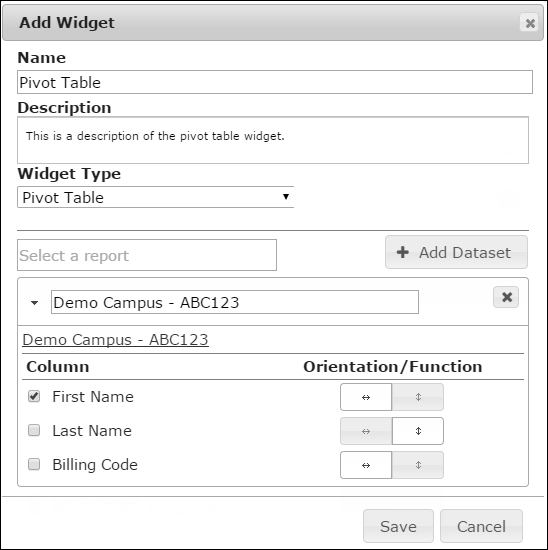
- In the Name box, type a name for the widget.
Note:
The widget name appears on the widget title bar.
- In the Description box, type a brief description of the widget.
- In the Widget Type list, select Pivot Table.
- In the box, search for a report, and then select a report.
- All reports in your organization or its descendants appear in the box. Parent organization filters appear for subgroup as well. In a widget you can select reports that are public or the reports that you have authored.
Note:
A warning sign next to the report title indicates that the report contains organization filters that do not allow dashboard access. The data for those organizations is not displayed on the dashboard.
- Click Add Dataset.
Note:
In a pivot table, you can have only one dataset per widget.
Click the  icon if you need to remove the dataset.
- In the Column section, select the X axis and Y axis for the pivot table.
Note:
You must select at least one X axis. If there are no Y axis available or you do not select a Y axis, by default the polar chart displays the count of grouped X axis values.
Click the  icon to display the data in a horizontal line as a table row. Click the
  icon to display the data in a vertical line to make it the pivot column.
- Click Save.
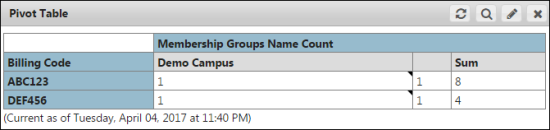
- The pivot table widget is saved and appears on your dashboard.
-
 Related Topics