Functions (Aggregate Report Mode only)
You can select functions to be performed on the grouped data within an aggregate report. These functions are displayed as columns in your aggregate report.
Note:
You can manage functions functionality only for aggregate reports.
For more information about aggregate report, see Create Custom Reports.
This topic includes:
Add a function column to an aggregate custom report
You can add multiple function columns to an aggregate report.
To add a function column to an aggregate custom report:
- On the NRS homepage, click Create a Custom Report.
-
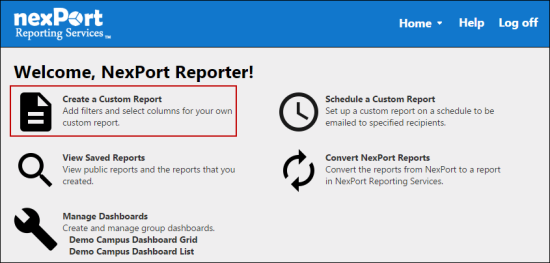
- The Create a Custom Report page is displayed.
- In the upper-left corner, click the
 icon to change the report mode to aggregate.
-
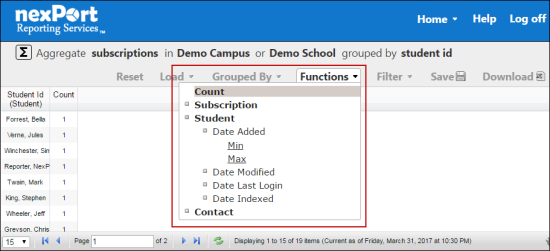
- In the menu, click Functions.
- The list of function properties are displayed. This includes dates and numeric properties.
- Select the function to use from the list of available functions displayed.
- The functions column is added and the table data is reloaded.
Remove a function column from an aggregate custom report
You can remove a function column from a custom report.
To remove a function column from an aggregate custom report:
- On the NRS homepage, click Create a Custom Report.
-
- The Create a Custom Report page is displayed.
- In the upper-left corner, click the icon to change the report mode to aggregate.
-
- Do one of the following steps:
- Hover over the function column that you need to remove. Click the
 icon that appears next to the column name.
- The function column is removed.
- or
- In the menu, click Functions.
- A list of functions properties are displayed.
-
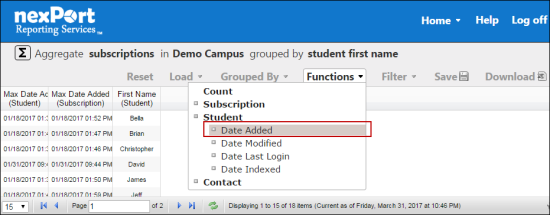
- Click the highlighted function property.
- The function property is removed from the filter display and the table data is reloaded.
 Related Topics
© NexPort Solutions 2017. All Rights Reserved.